Every day, we juggle endless notifications, half-finished notes, and shifting priorities. Yet somehow, our tools seem to create more noise than focus. The truth is, productivity has never been about doing more — it’s about doing what matters, with clarity. That’s exactly where AI productivity prompts come in.
When used well, AI doesn’t replace your thinking — it sharpens it. Each prompt becomes a small act of clarity: a way to direct your focus, manage your time, or automate the mental clutter. Over time, those small acts compound into flow.
AI isn’t magic — it’s structure
Most people open ChatGPT and type something vague like “help me plan my week.” Then they get frustrated when the result feels generic. But the issue isn’t AI — it’s the prompt. The quality of your prompt is the quality of your thinking.
“The better your question, the smarter your AI becomes.”
That’s why professionals create prompt systems instead of random requests. They turn AI into a consistent part of their workflow. If you want ready-to-use frameworks for this, the Prompt Library has categorized examples for focus, writing, and planning — all designed to keep you in flow, not friction.
How to design prompts that work every time
1. Start with clear intent
Before typing anything, ask yourself: what am I trying to achieve? A decision? A draft? A plan? The prompt should guide AI toward that outcome. Instead of “Help me be more productive,” try “Design a 2-hour morning plan that helps me finish my report before noon.”
2. Add context
AI can’t read your mind. Tell it who you are, what your goals are, and what success looks like. The more background it has, the more personalized the answer becomes.
3. Refine iteratively
Don’t expect perfection on the first try. Ask follow-ups: “Summarize that,” “Make it more visual,” “Turn it into steps.” The loop between you and AI is where intelligence grows.
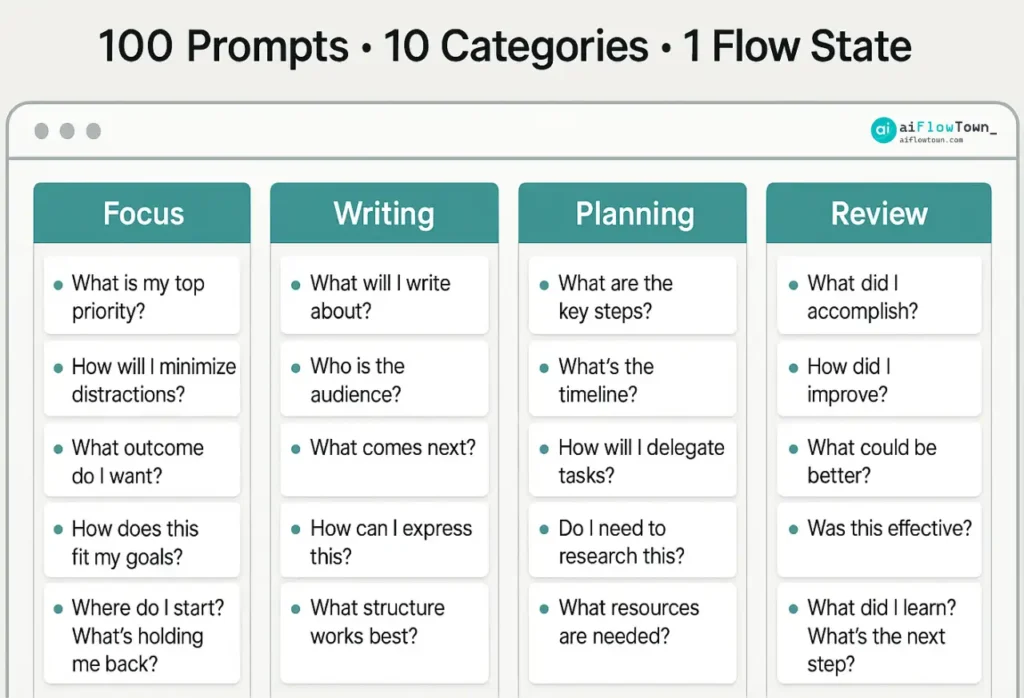
100 Prompts • 10 Categories • 1 Flow State
The 100 AI Prompts for Daily Flow
Here are 10 key categories — each with 10 practical examples — that professionals use to stay focused, organized, and creative.
Category
Sample Prompts
Focus & Deep Work
“Create a 90-minute deep work block with short recovery breaks.”
“List 5 mental triggers that destroy focus and how to neutralize them.”
“Write 3 AI prompts for focus I can reuse before deep work.”
“Suggest ways to turn my phone into a focus ally, not a distraction.”
“Help me rephrase my task list into focus-based themes.”
“Design a short breathing ritual before writing sessions.”
“Summarize 3 research-backed techniques to enter flow state.”
“Create a distraction detox plan for my workspace.”
“Turn this chaotic plan into a clean task priority list.”
“Suggest a reflection question after each deep work session.”
⏰ Time Management
“Turn my goals into a time-blocked weekly map.”
“Use the 80/20 rule to decide what to skip today.”
“Plan a balanced workday using energy zones.”
“Suggest AI prompts for time management I can automate.”
“Convert meeting notes into action steps.”
“Write a 10-minute daily review script.”
“Design a Sunday planning ritual with reflection prompts.”
“Summarize how to protect time for deep work.”
“Explain the difference between urgency and importance in my tasks.”
“Create a reset plan for when I fall behind schedule.”
Communication & Writing
“Rewrite this Slack message to sound calm but assertive.”
“Draft a follow-up email after a client call.”
“List ChatGPT prompts for work that improve clarity.”
“Turn this brainstorm into a 3-paragraph blog intro.”
“Summarize this report for non-technical readers.”
“Write a short note to motivate my team.”
“Suggest ways to avoid filler words in emails.”
“Turn this list into a crisp LinkedIn post.”
“Edit this paragraph for confidence and tone.”
“Make this document sound like a mentor’s advice.”
⚙️ Workflow & Automation
“List 5 repetitive tasks I can automate with AI.”
“Explain AI workflow automation in simple terms.”
“Generate a step-by-step plan to automate weekly reports.”
“Show me tools that connect Notion with email.”
“Turn my process notes into a recurring automation checklist.”
“Create trigger-based actions for my daily routine.”
“Recommend platforms for automating creative reviews.”
“Explain how to integrate Zapier and Google Sheets.”
“List benefits of automating meeting follow-ups.”
“Suggest ways to streamline approvals using AI.”
Problem Solving
“Break this project delay into smaller root causes.”
“List assumptions that may block this idea.”
“Suggest frameworks for making better trade-offs.”
“Write prompts that reframe my challenge differently.”
“Turn my messy notes into a problem-solving outline.”
“Simulate 3 possible outcomes for this choice.”
“Generate 5 creative alternatives for a stuck project.”
“Design questions to evaluate ideas faster.”
“Summarize lessons from similar past issues.”
“Help me communicate a problem without sounding negative.”
Learning & Growth
“Summarize this podcast into 3 key ideas.”
“Turn my highlights from this book into an action plan.”
“Create a 7-day learning sprint on focus habits.”
“Explain complex concepts using analogies.”
“List small daily learning prompts I can use at lunch.”
“Help me track what I’ve learned weekly.”
“Design a reading plan around AI productivity.”
“Write reflection questions after finishing a book.”
“Suggest journaling prompts for self-improvement.”
“Outline my 30-day skill growth roadmap.”
Creativity & Ideas
“Generate 10 headline ideas for an article about focus.”
“Brainstorm ways to make my workspace inspiring.”
“List AI prompts for productivity that enhance creative flow.”
“Help me combine 2 ideas into one fresh concept.”
“Suggest prompts that challenge conventional thinking.”
“Turn random notes into creative insights.”
“Write questions that trigger original ideas.”
“Map inspiration sources for my next project.”
“Summarize creative methods used by top designers.”
“Create a mini routine for idea generation.”
Work-Life Balance
“Plan a daily unwind ritual after deep work.”
“List AI prompts for time management that reduce burnout.”
“Write a short gratitude note to myself.”
“Suggest micro-habits for calm productivity.”
“Create a realistic schedule for work and rest.”
“Turn stress triggers into learning moments.”
“Design a digital detox plan for weekends.”
“List reflective questions to close my day well.”
“Summarize small ways to simplify my workflow.”
“Write a reminder prompt that says: rest is productive.”
Reflection & Review
“Write a weekly recap of my top 3 wins.”
“Generate prompts that help me review focus.”
“Summarize where I wasted time this week.”
“Turn my notes into a short progress story.”
“Design a Friday reflection checklist.”
“List ways to measure small progress daily.”
“Summarize patterns from my journal.”
“Write prompts for monthly self-review.”
“Generate reflection questions for creative projects.”
“Summarize how to track clarity instead of hours.”
Career & Purpose
“Map my strengths to possible new roles.”
“Turn my achievements into a confidence tracker.”
“Write 5 best AI productivity tools for my type of work.”
“Design a journaling system for career direction.”
“List prompts that align daily actions with purpose.”
“Write my 1-sentence purpose statement.”
“Help me plan a 90-day personal growth roadmap.”
“Summarize key signs of burnout.”
“Generate reflective questions for job clarity.”
“Suggest prompts for balancing ambition and rest.”
From prompts to real systems
Prompts are only powerful when they become habits. Don’t collect them — use them. Create a three-part structure: one prompt to start your day, one mid-day check-in, and one to close with reflection. That’s your foundation for flow.
Once you’re ready to connect these habits into automated systems, explore the AI Workflows section. It shows how to link prompts, tools, and triggers into smart routines that run almost by themselves.
Turn AI into Your Daily Productivity Partner
Why prompts sometimes fail (and how to fix them)
Issue
Solution
Too vague or broad
Add context and a clear outcome.
Overly long prompt
Simplify into smaller questions.
AI answers off-track
Guide tone or style explicitly.
Loss of focus
Review your core goal — clarity first, output later.
Turning AI into a thinking partner
AI is not about outsourcing creativity — it’s about amplifying it. When you refine your prompts, you’re really refining how you think. Over time, this builds pattern recognition, calm focus, and sharper reasoning. That’s the real value behind structured prompting.
“The most productive people don’t type faster — they think clearer.”
If you want to go further with automation setups or integrations, check our Tools & Apps hub — where each recommendation focuses on speed, simplicity, and focus alignment, not tech overload.
❓ FAQ
✨ How should I use these prompts every day?
Start with three: one for focus, one for planning, and one for review. Use them consistently — repetition builds flow.
Can I share them with my team?
Yes. Prompts work even better when used collectively — create a shared vault and refine them together.
Do I need paid tools to apply them?
Not at all. Free AI chat tools work fine. The structure matters more than the platform.
How do I track improvement?
Measure clarity, not quantity. When your prompts get shorter and your results sharper, you’re improving.
Final thoughts
Productivity is not about adding more tools or hours — it’s about building systems that think with you. AI can’t replace your focus, but it can reinforce it. Start by picking a few prompts that resonate, then shape them into routines that feel natural. Over time, you’ll stop fighting your schedule and start flowing with it.
Because in the end, the real productivity upgrade isn’t in your software. It’s in your sentences — the words you use to direct your mind, your tools, and your day. That’s the quiet strength of AI productivity prompts.
⚠️ Reminder: Even the smartest tools / AI can miss small details or make mistakes. Always double-check your work before presenting or publishing it - a quick review can save hours later.
Daniel Nguyen leads design and UX systems at aiFlowTown. He builds accessible, fast-loading interfaces that make complex AI tools feel simple and human. His work focuses on clarity, structure, and user trust - every layout and token must have a purpose. Daniel believes good design removes friction, not adds decoration.
At aiFlowTown, he created a shared UI framework that scales across guides and templates. Outside of UI work, he’s obsessed with Core Web Vitals, inclusive color systems, and small performance wins that compound over time.
His approach: fewer layers, fewer clicks, faster outcomes.