5-Minute AI Routines for Big Productivity Wins
The promise of AI often feels overwhelming. We hear about complex automation setups and sophisticated prompt engineering, leaving many wondering if they have the time or technical skill to truly benefit. But what if the biggest productivity gains didn’t come from massive overhauls, but from tiny, consistent actions? This guide introduces the power of 5-minute AI routines – micro-habits that leverage AI to deliver significant results with minimal time investment.
Forget spending hours learning intricate workflows. We’ll show you five specific, actionable daily AI habits you can implement in just five minutes each, using tools like ChatGPT. These aren’t just theoretical tips; they are practical processes designed to tackle common productivity bottlenecks like email overload, meeting summaries, and task planning. Learn how these 5 minute productivity hacks can compound over time to fundamentally change how you work.
This is about making AI work for you, not the other way around. It’s about finding the small levers that create the biggest impact, similar to the concepts found in many of the best AI productivity tools available today.
Part 1: The Power of Micro-Habits – Why 5 Minutes Matters
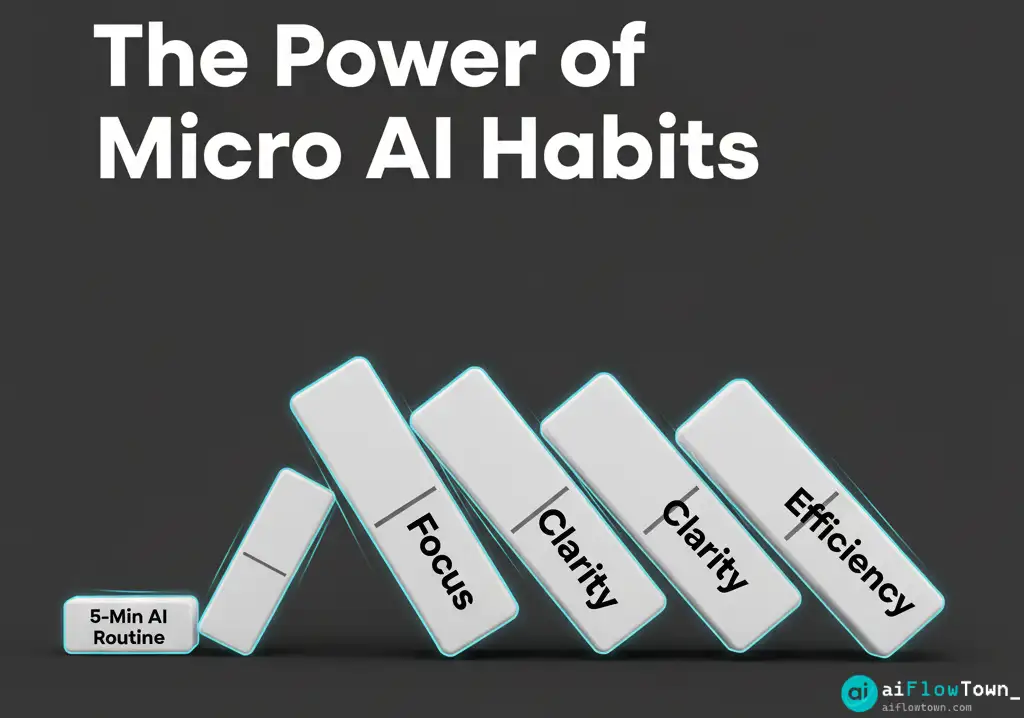
The concept of micro-habits suggests that small, consistent actions are far more effective for long-term change than large, infrequent efforts. Applying this to AI is revolutionary. Instead of aiming for a “perfectly automated life,” focus on integrating tiny AI interventions into your existing workflow. This philosophy aligns perfectly with building sustainable productivity systems.
Why are 5-minute routines so effective?
- Low Friction: The biggest barrier to adopting new habits is often the initial effort required. A 5-minute commitment is almost negligible, making it easy to start and maintain, even on your busiest days. This dramatically increases the likelihood of consistency.
- Immediate Wins & Dopamine Feedback: Each 5-minute routine is designed to provide a quick, tangible benefit (e.g., a prioritized inbox, a summarized meeting). This immediate positive feedback reinforces the behavior, making you more likely to repeat it.
- Compounding Effect Over Time: While five minutes seems small, the cumulative impact is massive. Saving just 15 minutes per day through three short routines adds up to over 90 hours saved per year – that’s more than two full work weeks!
- Organic Skill Building: Regularly interacting with AI, even for simple tasks, builds your “prompt intuition.” You naturally learn what works, how to phrase your requests better, and become more confident in leveraging AI for more complex challenges. It’s learning by doing, in bite-sized chunks.
You don’t need hours to leverage AI effectively. You need consistency. Five focused minutes with the right prompt can save you thirty minutes of manual effort later.
Part 2: Five High-Impact, 5-Minute AI Routines
Here are five specific routines you can implement immediately. Each includes a detailed prompt template designed for maximum efficiency. Remember to adapt the placeholders like `[Your list]` or `[Meeting Topic]` to your specific situation.
Routine 1: The 5-Minute Daily Email Triage
Problem: Waking up to an overflowing inbox creates instant overwhelm, making it hard to identify priorities and start the day proactively.
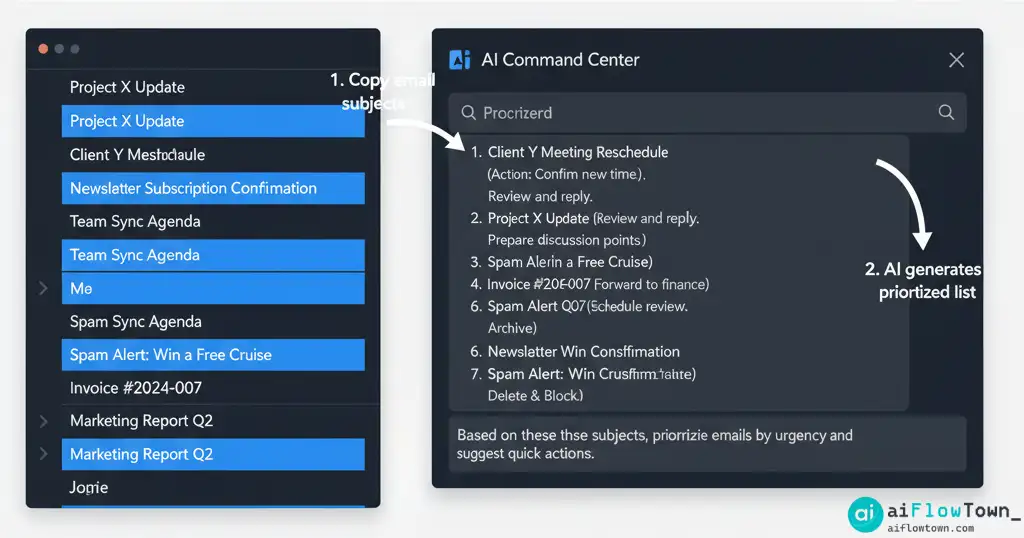
Routine (First 5 mins of workday): Quickly scan your inbox. Identify the 10-15 unread emails that seem potentially important. Copy *only* their subject lines (and perhaps sender names). Paste this list into ChatGPT or your preferred AI assistant.
The Goal: To get a rapid, AI-generated assessment of your inbox priorities without getting sucked into reading individual emails yet.
- 1. Daily Email Triage Prompt:
Act as an expert executive assistant skilled in inbox management. Below is a list of subject lines (and potentially senders) from my unread emails this morning. Your task is to:
1. Briefly categorize each email into ONE of these priority buckets: 'Urgent Action Needed (Reply ASAP)', 'Important (Reply Today)', 'Review When Possible (Non-Urgent)', or 'Likely Junk/Unsubscribe'.
2. Identify the SINGLE most important email I should address first based on typical business priorities (e.g., client requests, manager emails).
3. Format the output as two clear lists: "Categorized Emails" and "Top Priority Email".

Emails:
[Paste your list of subjects/senders here, one per line]
Benefit: In under 5 minutes, you transform a daunting inbox into an actionable, prioritized list. This prevents reactive email checking and allows you to start your day focused on what truly matters. This is a simple but powerful application of AI for time management.
Routine 2: The 5-Minute Meeting Summary Generator
Problem: You just finished a meeting, have a page full of messy notes (or a transcript), and need to quickly distill the key information for yourself or to share with others.
Routine (Immediately after a meeting ends): Copy your raw meeting notes or the transcript generated by a meeting tool. Paste the text into ChatGPT.
The Goal: To instantly create a structured, concise summary of decisions and action items before context is lost.
- 2. Meeting Summary Prompt:
Act as a professional meeting scribe with excellent summarization skills. Below are the raw notes/transcript from a meeting about [Meeting Topic]. Your task is to extract the following information and present it in a clean, easy-to-read format:
1.  **Executive Summary:** A 2-3 sentence overview of the meeting's main purpose and key outcomes.
2.  **Key Decisions Made:** A bulleted list of all significant decisions reached during the meeting.
3.  **Action Items:** A bulleted list of all specific tasks assigned. For each item, include the owner (if mentioned) and any deadline specified.

Notes/Transcript:
[Paste your raw notes or transcript here]
Benefit: Converts rambling notes into a professional summary in minutes. This drastically reduces the administrative burden after meetings and ensures accountability for action items.
Routine 3: The 5-Minute “Next Action” Planner
Problem: You’re facing a large, complex, or intimidating project/task and feel stuck, leading to procrastination.
Routine (When feeling stuck or overwhelmed): Open ChatGPT and clearly state the task or project you’re avoiding.
The Goal: To use AI as a coach to break through inertia by identifying the smallest possible starting point.
- 3. “Next Action” Prompt:
Act as a productivity coach specializing in overcoming procrastination using the 'next action' methodology. I need to complete the following project/task: "[Describe your big task clearly, e.g., Prepare the presentation for the Q4 client review]". I'm feeling overwhelmed and unsure where to start.
Your job is to guide me. Ask me clarifying questions (one at a time) if needed to understand the task better, and then help me identify the absolute smallest, most concrete physical action I can take in the next 5-15 minutes to gain momentum on this task. State only that single next action.
Benefit: This uses AI to cut through the mental fog of overwhelm. By focusing on a tiny, non-intimidating first step (e.g., “Open the presentation template” or “List the three key data points needed”), it helps you break inertia and start making progress. This is a powerful technique to boost productivity with AI.
Routine 4: The 5-Minute Content Idea Spark
Problem: You need fresh ideas for your blog, social media, or newsletter, but you’re experiencing creative block.
Routine (During content planning sessions): Provide ChatGPT with a core topic, a link to a recent piece of content, or even just your target audience.
The Goal: To quickly generate a list of relevant, specific, and potentially unexpected content angles.
- 4. Content Idea Prompt:
Act as a creative content strategist specializing in [Your Industry/Niche, e.g., "B2B SaaS marketing"]. Our primary content theme is [Your Core Topic, e.g., "AI for Sales Teams"]. Our target audience is [Your Audience, e.g., "Sales Managers at mid-sized tech companies"].
Generate 5 specific and engaging content ideas (e.g., blog post titles, webinar topics, short video concepts) that would resonate with this audience and address their key pain points around [Audience Pain Point, e.g., "lead qualification" or "sales forecasting"].

[Optional: Analyze this recent article for inspiration: Paste URL or text here]
Benefit: Instantly overcomes the “blank page” syndrome by providing a diverse set of starting points, saving valuable brainstorming time and often sparking more original ideas.
Routine 5: The 5-Minute Learning Synthesizer
Problem: You consume a lot of information (articles, podcasts, videos) but struggle to extract and retain the most important insights.
Routine (Immediately after consuming content): Copy the text of the article, a summary, or the transcript. Paste it into ChatGPT.
The Goal: To quickly distill the core message and actionable takeaways from a piece of content.
- 5. Learning Synthesizer Prompt:
Act as an expert learning assistant skilled at synthesizing information. Below is the text content from an article/video about [Topic]. Your task is to read through it and extract the following:
1.  **Core Argument:** What is the single main point the author is trying to make (1-2 sentences)?
2.  **Key Takeaways:** List the 3-5 most important supporting points or actionable insights.
3.  **One Interesting Fact/Quote:** Identify one particularly surprising statistic or memorable quote.
Format the output clearly with headings for each section.

Content:
[Paste the text/transcript here]
Benefit: Transforms passive consumption into active learning. By forcing you to extract key points (via the AI), it significantly improves comprehension and makes the information easier to recall and apply later.
Comparing the 5-Minute AI Routines
This table provides a quick overview of the routines and their benefits:
| Routine Name | Typical Time | Primary Tool | Input | Output | Key Benefit |
|---|---|---|---|---|---|
| Daily Email Triage | ~5 min | ChatGPT / Claude etc. | Email Subjects/Senders | Prioritized List | Reduces inbox overwhelm & focuses morning |
| Meeting Summary | ~5 min | ChatGPT / Claude etc. | Raw Notes/Transcript | Structured Summary & Action Items | Saves significant admin time post-meeting |
| “Next Action” Planner | ~5 min | ChatGPT / Claude etc. | Overwhelming Task Description | Smallest Concrete First Step | Overcomes procrastination & builds momentum |
| Content Idea Spark | ~5 min | ChatGPT / Claude etc. | Topic/Audience/Existing Content | Targeted Content Ideas/Titles | Breaks creative blocks & fuels content calendar |
| Learning Synthesizer | ~5 min | ChatGPT / Claude etc. | Article/Transcript Text | Key Takeaways & Core Argument | Accelerates learning & improves retention |
Part 3: Integrating AI Routines into Your Day – Building the Habit
Knowing these routines is one thing; making them a consistent part of your day is another. Success lies in reducing friction and linking them to existing habits.
- Choose Your Trigger Point: Link each 5-minute routine to a specific, existing event in your daily schedule. For example:
- Email Triage -> Right after opening your laptop / before checking email directly.
- Meeting Summary -> Immediately after*the meeting ends / before moving to the next task.
- Next Action -> Whenever you feel the urge to procrastinate on a specific task.
- Content Idea Spark -> During your scheduled content planning block.
- Learning Synthesizer -> Immediately after finishing an article or video.
- Leverage Text Expanders: This is crucial for making these routines effortless. Save your customized prompt templates in a text expander tool (like Raycast Snippets, Espanso, or TextExpander). Assign a short, memorable keyword (e.g., `;aisummary`, `;ainext`, `;aiemail`). Typing this keyword will instantly paste the full prompt into your AI chat window. This removes almost all the friction.
- Start Small & Be Patient: Don’t try to implement all five routines on day one. Pick the *one* routine that addresses your biggest current pain point. Practice just that one routine consistently for a full week. Once it feels automatic, consider adding a second one. Building habits takes time and repetition.
- Track Your Progress (Optional): For extra motivation, keep a simple checklist for a week. Did you complete your chosen 5-minute routine today? Seeing a streak can be a powerful motivator.
Consistency is far more important than intensity when building these micro ai automation habits. The goal is to make them so easy and automatic that you barely notice you’re doing them – until you see the cumulative results.
Conclusion: Small Levers, Big Impact – The Power of AI Routines
You don’t need complex, multi-step automations or hours of prompt engineering to dramatically improve your productivity with AI. By focusing on these high-leverage, 5-minute AI routines, you can reclaim significant amounts of time and mental energy every single day. These quick wins build momentum and confidence, proving that AI can be a simple, accessible partner in achieving your goals. Explore more ways to integrate AI into your daily tasks with our comprehensive prompt library.
Start today. Pick one routine, set a timer for five minutes, and experience the immediate impact. You might be surprised how much difference five minutes can make in building more effective quick ai workflows.
❓ FAQ
⏱️ Can I really get meaningful results in just 5 minutes?
Yes. The key is the focused nature of the task. These routines aren’t trying to solve huge problems; they’re designed to tackle specific, high-friction points in your workflow (like prioritizing email or summarizing notes). The AI excels at these focused, text-based tasks, delivering significant value quickly.
Do I need a paid AI subscription for these routines?
Most of these routines work perfectly well with the free versions of powerful AI models like ChatGPT (GPT-3.5) or Claude Sonnet. While paid versions might offer slightly faster or more nuanced responses, the free tiers are more than capable for these specific, structured tasks.
⚙️ Can I automate these routines even further?
Absolutely. Once you’re comfortable with the manual 5-minute routines, you can explore tools like Zapier to fully automate them. For instance, you could build a Zap that automatically runs the “Email Triage” prompt on new emails matching certain criteria and sends the summary to Slack. Exploring AI automation tools is a great next step.
⚠️ Reminder: Even the smartest tools / AI can miss small details or make mistakes. Always double-check your work before presenting or publishing it - a quick review can save hours later.