
Reclaim AI: The Smart Calendar That Defends Your Focus
Your calendar is supposed to be your ally in the battle for productivity, but often it feels like the enemy. Meetings pile up, tasks slip through the cracks, and those crucial blocks of deep work time get squeezed out by urgent, but less important, demands. What if your calendar could intelligently defend your focus time and automatically schedule your tasks and habits? That’s the promise of Reclaim AI, a smart calendar assistant designed to automate your schedule and maximize your most valuable asset: your attention.
This guide provides a comprehensive, step-by-step walkthrough on how does Reclaim AI work and how you can leverage it to transform your chaotic calendar into a powerful productivity engine. We’ll cover everything from initial setup to mastering its core features like Tasks, Habits, and Smart Meetings.
If you’re tired of constantly juggling time blocks and feeling like your schedule runs you, this guide is for you. Reclaim AI is one of the leading contenders for the title of the best AI calendar assistant, representing a significant leap forward in AI automation for beginners and experts alike.
Part 1: The Problem Reclaim AI Solves – Calendar Tetris & Lost Focus
Most knowledge workers face a constant struggle:
- Meeting Overload: Back-to-back meetings leave little room for actual work.
- Task Neglect: Important tasks get pushed aside because there’s no dedicated time slot for them.
- Fragmented Focus: Even when you have free time, it’s often broken into small, unusable chunks, preventing deep concentration.
- The Planning Overhead: Manually blocking out time for tasks, breaks, and habits takes significant time and effort each week.
Reclaim AI tackles these issues by acting as an intelligent layer on top of your existing Google Calendar. It automatically finds the best time for your tasks and habits, defends your focus blocks, and ensures your schedule reflects your true priorities.
Reclaim AI doesn’t just manage your time; it actively creates and defends the space you need to think and produce your best work.

Part 2: Getting Started with Reclaim AI – Setup in Minutes
Setting up Reclaim AI is straightforward. Here’s how to get started:
- Sign Up: Go to the Reclaim AI website and sign up using your Google account.
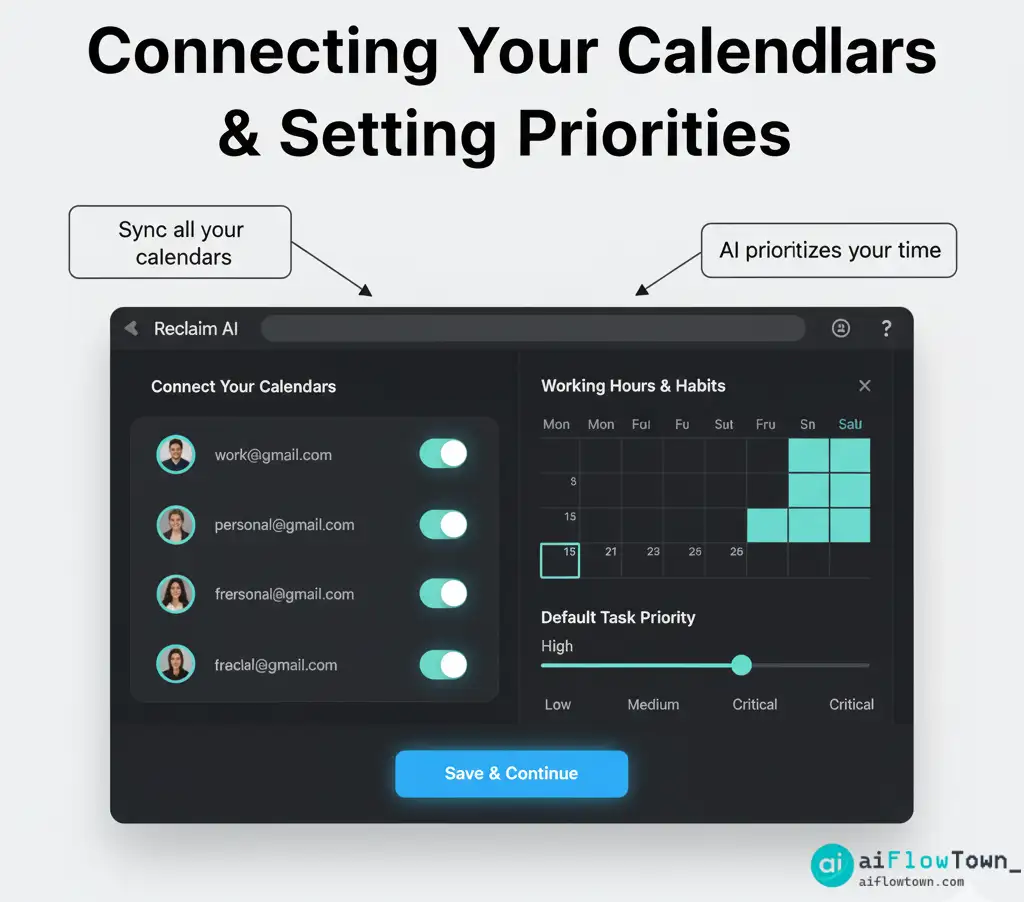
- Connect Your Calendars: Grant Reclaim permission to access your Google Calendar(s). You can connect multiple accounts (work, personal) and Reclaim will see your availability across all of them to avoid conflicts.
- Define Your Hours: Set your working hours and meeting hours. Reclaim uses this information to know when it’s appropriate to schedule tasks, habits, and meetings. Be realistic about your start/end times and when you prefer to take meetings.
- Set Priorities (Optional but Recommended): Reclaim allows you to define priority levels for different types of events (e.g., Critical meetings, High-priority tasks). This helps the AI make smarter scheduling decisions when conflicts arise.
Part 3: Mastering Reclaim AI’s Core Features
Once set up, the real power comes from using Reclaim’s core scheduling features: Tasks, Habits, and Smart Meetings.
1. Tasks: Turning Your To-Do List into Calendar Events
This is where you tell Reclaim about the work you need to get done.
- How it works: Instead of just listing a task, you tell Reclaim the task name, estimated duration (e.g., 2 hours), and deadline.
- The Magic: Reclaim analyzes your existing calendar and automatically finds the best available time slots to block out for that task before the deadline. It creates actual events on your calendar.
- Flexibility: If a meeting gets scheduled over your task time, Reclaim automatically reschedules the task block to the next best available slot. It adapts dynamically.
- Example: You tell Reclaim: “Task: Write blog post draft, 3 hours, due Friday.” Reclaim might block out 1.5 hours on Wednesday afternoon and another 1.5 hours on Thursday morning on your calendar.
2. Habits: Building Consistency Automatically
Habits are recurring activities you want to make time for regularly (e.g., exercise, lunch, learning).
- How it works: You define the habit (e.g., “Gym”), its duration (e.g., 1 hour), how often (e.g., 3 times per week), and your preferred time range (e.g., between 7 AM and 9 AM, or during lunchtime).
- The Magic: Reclaim finds the best available slots within your preferred ranges each week and automatically blocks them out on your calendar. It ensures your important routines don’t get forgotten.
- Defensibility: You can set how “defensible” a habit is. A highly defensible habit (like lunch) is less likely to be rescheduled if a conflict arises, while a less defensible habit (like “Read industry news”) might be moved more easily.
- Example: You set up a “Workout” habit for 1 hour, 3 times a week, ideally between 4 PM and 6 PM. Reclaim will automatically find and book those slots for you each week, adapting if meetings pop up. This feature alone is a game-changer for building reclaim habits.
3. Smart Meetings & Scheduling Links
Reclaim also optimizes meeting scheduling.
- Scheduling Links: Create custom links (similar to Calendly) that show your true availability, considering not just existing meetings but also the time needed for your scheduled tasks and habits. This prevents people from booking over your important work time.
- Smart Meetings: When scheduling internal meetings, Reclaim can analyze attendees’ calendars (if they also use Reclaim) to find the optimal time that minimizes disruption to everyone’s focus blocks.
4. Calendar Sync: Your Unified View
If you juggle multiple Google Calendars (e.g., work and personal), Reclaim’s Calendar Sync feature is invaluable.
- How it works: It creates copies of events from one calendar onto another, blocking out the time while keeping the details private (optional).
- Benefit: You see your true availability across all calendars without having to constantly switch between them or share sensitive personal appointments with colleagues.
Reclaim AI Feature Comparison
While Reclaim offers a free plan, some features are reserved for paid tiers. Here’s a simplified comparison:
| Feature | Free Plan | Paid Plans (e.g., Starter, Business) |
|---|---|---|
| Calendar Sync (Personal) | ✅ (Limited) | ✅ (Unlimited & Advanced Options) |
| Habit Scheduling | ✅ (Limited number of habits) | ✅ (Unlimited Habits) |
| Task Scheduling | ✅ (Limited weeks of scheduling) | ✅ (Unlimited weeks & Advanced Prioritization) |
| Scheduling Links | ✅ (Limited) | ✅ (Unlimited &m; Customizable) |
| Buffer Time | ❌ | ✅ (Automatic time added before/after meetings) |
| Team Features (Smart Meetings) | ❌ | ✅ |
Note: Features and Reclaim AI pricing may change. Check their official website for the latest details.
Part 4: Reclaim AI Use Cases – Who Is It For?
Reclaim AI is particularly beneficial for:
- Busy Professionals & Managers: Anyone juggling multiple projects and frequent meetings who struggles to find time for focused work.
- Freelancers & Solopreneurs: Individuals who need to structure their own day and protect client work time from personal appointments.
- Teams: Teams that want to optimize internal meeting schedules and make it easier to find time to collaborate without constant back-and-forth.
- Anyone Practicing Time Blocking: If you believe in the power of time blocking but find the manual process tedious, Reclaim AI automates it beautifully. This makes it a great tool for improving your mindset and focus.
While tools like Motion offer similar features, the key difference often comes down to user interface preferences and specific feature implementations (Reclaim AI vs Motion is a common comparison). Reclaim often appeals to users who want deep integration with Google Calendar and a focus on flexible habit scheduling.
Conclusion: Take Back Control of Your Time
Reclaim AI is more than just a scheduling tool; it’s a statement about the value of your time and focus. By automating the tedious process of calendar management and intelligently defending your deep work blocks, it empowers you to be more proactive and intentional with your day. The learning curve is gentle, and even the free plan offers significant value. If you feel like your calendar controls you, it’s time to try Reclaim AI and start taking back control. Connect your calendar, define your first Habit or Task, and experience the relief of knowing your priorities are automatically protected.
❓ FAQ
❓ How does Reclaim AI actually block time on my Google Calendar?
Reclaim creates actual events on your Google Calendar for your Tasks and Habits. You can configure how these events appear (e.g., color-coded, with specific titles). It marks these blocks as “busy” so that others see you as unavailable during those times.
Is the free version of Reclaim AI useful enough?
Yes, the free plan is surprisingly generous and provides significant value, especially for individuals. It allows you to schedule several Habits, sync personal calendars, and schedule Tasks within a limited timeframe. It’s an excellent way to experience the core benefits before deciding if you need the advanced features of a paid plan.
Is Reclaim AI secure? Does it read my emails?
Reclaim AI requires access to your calendar data to function, but according to their privacy policy, they prioritize security and do not read your emails. They only analyze event times, titles, and availability status to schedule effectively. As with any app, it’s crucial to review their privacy policy.
What happens if I manually move a Task or Habit block that Reclaim scheduled?
Reclaim is designed to be flexible. If you manually move or delete an event it created, it will generally adapt and try to reschedule the remaining time for that Task or Habit according to your preferences and deadlines. It understands that you are ultimately in control of your calendar.
⚠️ Reminder: Even the smartest tools / AI can miss small details or make mistakes. Always double-check your work before presenting or publishing it - a quick review can save hours later.