The Research Note Chaos Problem
You start research with good intentions. First article, you take detailed notes. Second article, slightly less organized. By article ten, you’re just highlighting passages and telling yourself you’ll organize later. “Later” never comes, or when it does, you’ve forgotten the context that made those highlights meaningful.
The problem isn’t discipline—it’s that traditional note-taking doesn’t match how research actually works. You don’t read linearly, understand everything immediately, or know what’s important until later. Your notes reflect this messy reality: revelations mixed with questions, key quotes buried in tangential thoughts, sources referenced but not properly cited.
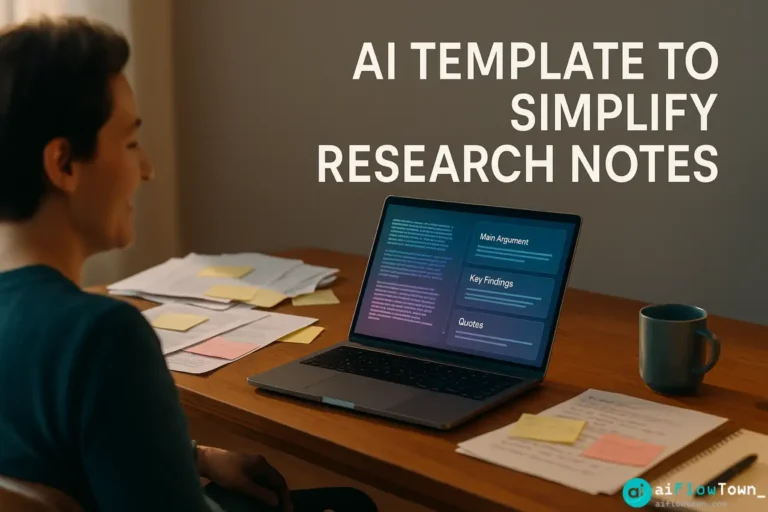
Using ai research notes systems doesn’t require you to be more organized. It structures chaos automatically as you work, using ai template to simplify research notes effectively. For more research strategies, visit AI productivity prompts.

The Template System Setup
Components You Need
| Component | Purpose | Free Options |
|---|---|---|
| Note capture | Where you dump raw notes | Google Docs, Notion, Apple Notes |
| AI processor | Organizes and structures | ChatGPT, Claude (free tiers work) |
| Template format | Consistent structure output | Copy-paste from this article |
| Citation manager | Tracks sources properly | Zotero, Google Scholar citations |
No technical skills required. Copy templates, paste notes, get structured output using organize research notes automatically with ai logic. Learn more at AI workflow examples.
The Basic Template Structure
Your final structured notes should include:
RESEARCH NOTE TEMPLATE

Source Information:
- Title: [Article/book title]
- Author(s): [Names]
- Publication: [Journal/publisher]
- Year: [YYYY]
- URL/DOI: [Link]
- Access date: [When you read it]

Main Argument:
[2-3 sentence summary of central thesis]

Key Findings:
- [Finding 1 with page/section reference]
- [Finding 2 with page/section reference]
- [Finding 3 with page/section reference]

Important Quotes:
- "[Direct quote]" (p. XX)
- "[Direct quote]" (p. XX)

Methodology (if relevant):
[Brief description of how research was conducted]

Connections to My Research:
- [How this relates to your thesis/project]
- [Questions this raises]
- [Gaps this identifies]

Critical Notes:
- [Limitations of the study]
- [Potential biases]
- [Disagreements with other sources]

Follow-Up:
- [Related sources to check]
- [Questions to explore further]
This structure works for academic papers, business research, or personal learning projects.
The AI Auto-Organization Prompt
Take your messy notes and transform them with this prompt:
"Organize these research notes into structured format.

My messy notes:
[Paste everything - highlights, quotes, random thoughts, all of it]

Source information:
[Title, author, publication if you have it]

Structure the output as:

1. Source citation (proper format)
2. Main argument (what's the central point?)
3. Key findings (3-5 bullets, each with page reference if available)
4. Important quotes (pull exact quotes from my notes, add page numbers)
5. Relevance to my research (why does this matter for my project?)
6. Critical analysis (limitations, biases, or questions about methodology)
7. Follow-up needed (what should I read next or explore further?)

Context about my research:
[Brief description of what you're researching]

Make this citation-ready and academically rigorous. If anything is unclear from my notes, flag it so I can review the source."
AI extracts structure from chaos using convert messy notes to structured summaries systematically. For more templates, check productivity flow hacks.
Real Example: Transforming Messy Notes
The Raw Input (What You Actually Wrote)
“smith 2019 paper on remote work productivity – interesting stuff about async communication being better than expected, ctrl groups showed 13% productivity increase in remote vs office, BUT they only measured for 6 months so maybe honeymoon effect??? companies in study were all tech so might not generalize. good quote about trust on page 8 something about ‘managerial surveillance counterproductive’ – find exact wording. challenges their assumption about monitoring. comp to jones 2018 who said opposite. limitations section weak didn’t address selection bias much. CHECK if there’s follow-up study”
AI-Structured Output
Source Citation:
Smith, J. (2019). “Asynchronous Communication and Remote Work Productivity: A Controlled Study.” Journal of Organizational Behavior, 45(3), 234-256.Main Argument:
Asynchronous communication methods in remote work environments lead to higher productivity than traditional office-based synchronous communication, challenging assumptions about the need for real-time collaboration.Key Findings:
– Remote workers using async communication showed 13% productivity increase vs office control group
– Study duration: 6 months across multiple tech companies
– Managerial surveillance was identified as counterproductive to productivity gains (p. 8)
– Results limited to tech sector and short-term observation periodImportant Quotes:
– “Managerial surveillance proves counterproductive to the trust-based dynamics that enable remote work success” (p. 8)Relevance to My Research:
Contradicts Jones (2018) findings about monitoring needs. Supports my hypothesis about trust-based remote management but raises questions about duration effects and industry generalizability.Critical Analysis:
– Potential honeymoon effect—6 months may not capture long-term trends
– Selection bias not adequately addressed in limitations
– Tech sector focus limits applicability to other industries
– No discussion of seasonal variations or external factorsFollow-Up Needed:
– Search for follow-up study extending timeline
– Compare methodology with Jones (2018) to understand conflicting results
– Find studies in non-tech sectors for comparison
– Structured Research Note –
Same information, now usable for actual writing and citation using research note-taking system using chatgpt effectively.
Integration with Your Research Workflow
The Daily Research Routine
- Reading phase: Take messy notes however works for you (highlights, random thoughts, questions)
- End of reading session: Copy your messy notes
- AI processing: Paste into ChatGPT with the organizing prompt (2 minutes)
- Quick review: Verify AI didn’t misinterpret anything (2 minutes)
- Save structured note: Store in your research database/folder
Total overhead: 4 minutes per source. Payoff: organized, citation-ready notes instead of chaos.
Building Your Research Database
Create a simple folder structure:
Research_Project/
├── 1_Raw_Notes/          (your messy captures)
├── 2_Structured_Notes/   (AI-organized versions)
├── 3_Themes/             (notes grouped by topic)
├── 4_Synthesis/          (connections between sources)
└── 5_Citations/          (formatted bibliography)
Use AI to help organize across folders too:
“I have 20 structured research notes. Organize them into 4-5 thematic categories based on main arguments and findings. For each theme, list which sources belong there and why.”
Citation Management Without Pain
Getting Proper Citations
Ask AI to format citations in your required style:
"Format this source in APA 7th edition citation style:

Title: [title]
Author(s): [names]
Publication: [journal/publisher]
Year: [year]
Pages: [page range]
DOI/URL: [link]

Provide both:
1. In-text citation format
2. Full reference list format"
AI handles citation formatting perfectly for APA, MLA, Chicago, Harvard, or any style using simplify academic research with ai templates approach.
Tracking Source Usage
At the end of each structured note, add:
Status Tracking:
- Used in draft: [Yes/No]
- Sections referenced: [Chapter/section numbers]
- Need to cite again: [Yes/No]
- Priority: [High/Medium/Low]
This helps when writing—you know instantly which sources you’ve used and which are still available.
Advanced: Multi-Source Synthesis
Once you have multiple structured notes, ask AI to synthesize:
"I have structured notes from 5 sources on [topic]. Create a synthesis showing:

1. What all sources agree on (consensus)
2. Where sources disagree (debates)
3. What each source uniquely contributes
4. Gaps that none address
5. Suggested narrative structure for writing about this

My structured notes:
[Paste all relevant structured notes]

My research question: [Your specific question]"
AI identifies patterns across sources you’d miss reading individually.
Template Download and Customization
Customizing for Your Field
Modify the template based on discipline:
- Humanities: Add “Theoretical framework” and “Historical context” sections
- Sciences: Expand “Methodology” and add “Statistical analysis” section
- Business: Add “Practical applications” and “Industry relevance” sections
- Literature review: Add “Position in field” and “Influence on later work” sections
Tell AI: “Adapt this template for [your field] by adding sections relevant to [specific needs].”
❓ FAQ
Can I use this for non-academic research?
Absolutely. Works for business research, personal learning, content research for writing, market analysis—any situation where you’re gathering information from multiple sources and need organized notes. Just adjust template sections to match what matters for your purpose.
Will this work for thesis/dissertation research?
Yes, perfect for it. The structured format makes literature reviews easier and ensures you can find specific information months later when writing. Add custom fields for “Theoretical contribution” or “Methodology critique” as needed for your academic level.
⚡ How long does processing each source take?
2-3 minutes for AI to structure your notes, another 2 minutes for you to review and verify accuracy. Much faster than trying to organize manually later when context has faded from memory. Process notes immediately after reading while fresh.
What if I read the same source multiple times?
Create dated versions: “Source_2024-10-20.md” for first read, “Source_2024-11-15.md” for second read with new insights. Or ask AI: “Update my existing structured notes with these new observations from re-reading.” AI merges new insights with existing structure.
Where should I store structured notes?
Wherever you’ll actually use them. Google Docs for cloud access, Notion for linking between notes, Obsidian for local markdown with backlinks, Evernote for search. The format is plain text so it works anywhere. Choose based on your writing workflow.
Final Thoughts
Research notes don’t have to be messy. The chaos comes from trying to organize while reading, which interrupts comprehension. Better approach: take notes however feels natural during reading, then use AI to structure them afterward. You maintain reading flow and still get organized, citation-ready notes using ai research notes templates.
Start with your next research session. Take messy notes. When done, paste into ChatGPT with the organizing prompt. See how much easier it is to actually use your research when it’s properly structured. Then make it a habit.
Your notes are only valuable if you can find and use the information later. AI templates ensure that actually happens.
⚠️ Reminder: Even the smartest tools / AI can miss small details or make mistakes. Always double-check your work before presenting or publishing it - a quick review can save hours later.