When Performance Collapses Overnight
You wake up Monday morning. Open your site. Everything looks normal. Then you check PageSpeed Insights—score dropped from 96 to 52 overnight. You panic. What broke? You didn’t deploy anything. No plugin updates. No server changes. Nothing.
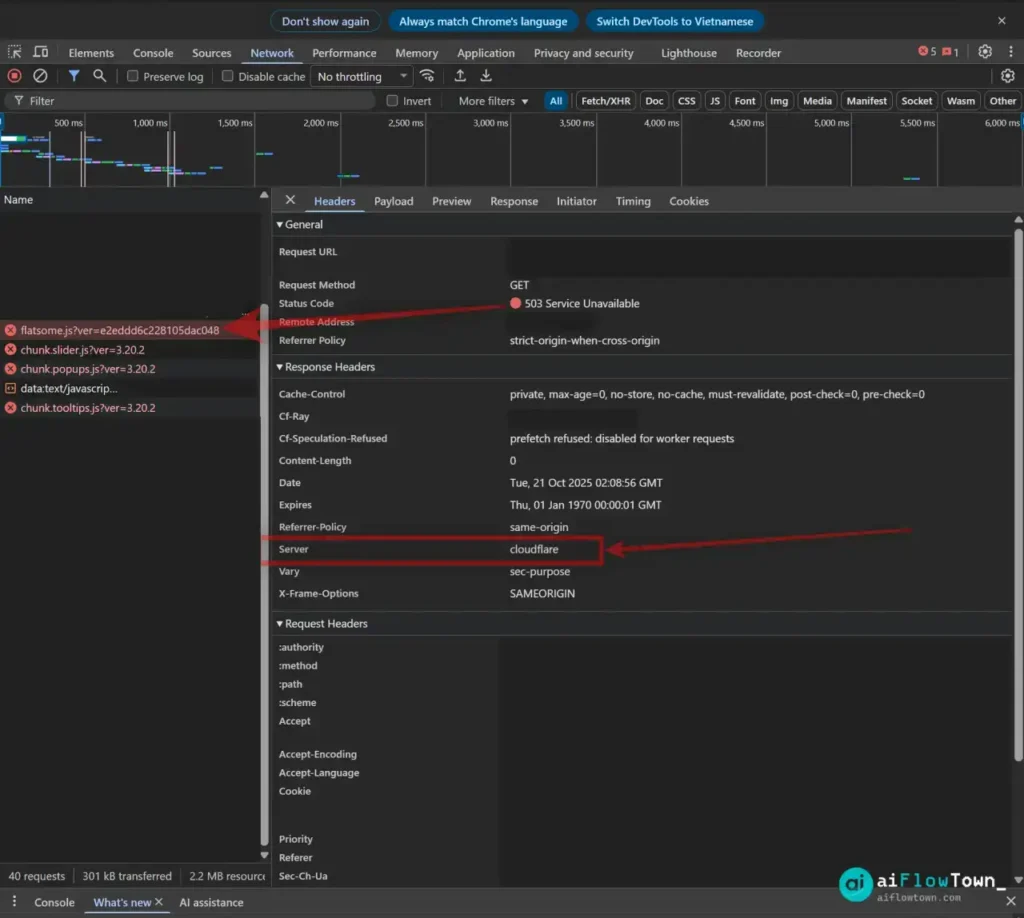
You open Chrome DevTools. Network tab shows the problem: chunk.slider.js returns 503 Service Unavailable. chunk.popups.js also 503. Several other JavaScript files randomly failing. But when you access those exact same files directly in your browser or via curl, they load perfectly. This is the javascript 503 service unavailable error mystery that makes no logical sense.
Your first instinct: check the server. LiteSpeed logs? Clean. Nginx error logs? Nothing unusual. File permissions? Correct. The files physically exist and your origin server is responding normally. So why are JavaScript files failing in the browser while working everywhere else?
The Contradictory Symptoms
Let’s map out what you’re seeing because the pattern matters:
What Works
- ✅ Direct file access via URL loads instantly
- ✅ curl requests return 200 OK with full content
- ✅ Server logs show no errors or failed requests
- ✅ Google Search Console URL inspection says “URL is available”
- ✅ Other static assets load fine
What Breaks
- ❌ Browser DevTools shows 503 with
Server: cloudflareheader - ❌ Pagespeed suddenly dropped without code changes
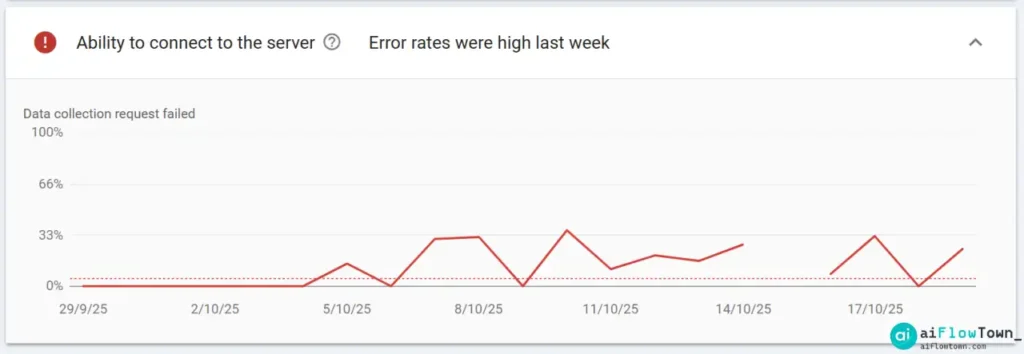
- ❌ Google Search Console crawl stats show “Ability to connect to server – error rates high”
- ❌ PageSpeed Insights flags “Reduce unused JavaScript” and “Eliminate render-blocking resources”
- ❌ Random pattern—sometimes files load, sometimes they don’t
This contradiction is key: your origin server works perfectly, but something between the browser and your server is breaking JavaScript delivery. That “something” is your CDN.
How ChatGPT Helped Crack the Case
After hours of traditional debugging—checking server configs, reviewing logs, testing different browsers—nothing made sense. The breakthrough came from using AI-powered troubleshooting prompts with ChatGPT.
The key was feeding ChatGPT the complete symptom pattern:
"JavaScript files return 503 in browser DevTools but 200 OK via curl. Response header shows 'Server: cloudflare'. Origin server logs are clean. PageSpeed dropped from 95 to 52 overnight. No code changes deployed. Google Search Console reports server connection errors but URL inspector says available."ChatGPT immediately identified the pattern: “This points to CDN edge cache issues, not origin server problems. The ‘Server: cloudflare’ header means Cloudflare is responding with cached 503s. Check for recently enabled Cloudflare features, particularly beta optimizations like SpeedBrain.”
That insight cut through hours of misdirected debugging. Traditional troubleshooting focused on the server because that’s where problems usually are. AI recognized the pattern of CDN edge behavior that humans commonly overlook. For more on using AI to solve complex technical problems, this approach shows how the right questions to AI can reveal hidden issues.
The Real Culprit: Cloudflare SpeedBrain Beta
Following ChatGPT’s direction, the investigation focused on Cloudflare’s recent feature changes. The culprit: SpeedBrain (Beta).
What SpeedBrain Is Supposed to Do
SpeedBrain uses the Speculation Rules API to predict what users might click next and prefetch those resources ahead of time. The theory: if AI can predict your next action, it can load the page before you click, making navigation feel instant. Sounds smart in product demos.
What SpeedBrain Actually Does in Beta
On certain Cloudflare edge servers—particularly in Asia-Pacific regions like Singapore, Hong Kong, and Tokyo—SpeedBrain misclassifies some JavaScript requests. It tries to prefetch chunk.popups.js using a speculative request that doesn’t complete properly. The edge server then caches an empty or partial response and serves it with 503 status code.
Here’s the critical part: your origin server never sees these broken requests. Cloudflare’s edge is responding with cached 503s before the request even reaches your server. That’s why your logs look clean while browsers are failing. This is exactly why only some javascript files return 503—it’s not about the files themselves, it’s about which ones trigger SpeedBrain’s speculative logic.
The Geographic Pattern
If you’re experiencing this issue, check where your traffic comes from. Sites with significant Asia-Pacific traffic are hit hardest because those edge servers seem most affected by the SpeedBrain beta bugs. European and US traffic might work fine while APAC users see consistent failures.
The SEO Damage Chain
This isn’t just a technical annoyance—it’s an SEO problem with real consequences.
PageSpeed Impact
When JavaScript files fail to load, PageSpeed Insights sees:
- Incomplete page render
- Higher Total Blocking Time (TBT)
- Poor First Contentful Paint (FCP)
- Failed Largest Contentful Paint (LCP)
Your score tanks even though your actual site code is fine. Google’s testing tool hits broken Cloudflare cache and reports poor performance that real users might not experience consistently.
Google Search Console Crawl Failures
Worse: Googlebot encounters the same broken cache. When Google tries to render your JavaScript-dependent content, it gets 503 responses. Search Console logs this as google search console ability to connect to server error even though your server is perfectly healthy. From Google’s perspective, your site is intermittently unavailable.
This impacts:
- ⚠️ Indexing speed—Google can’t render pages properly
- ⚠️ Core Web Vitals—metrics show poor performance
- ⚠️ Crawl budget—wasted on failed requests
- ⚠️ Rankings—sites with availability issues get deprioritized
The Fix: Disable One Toggle
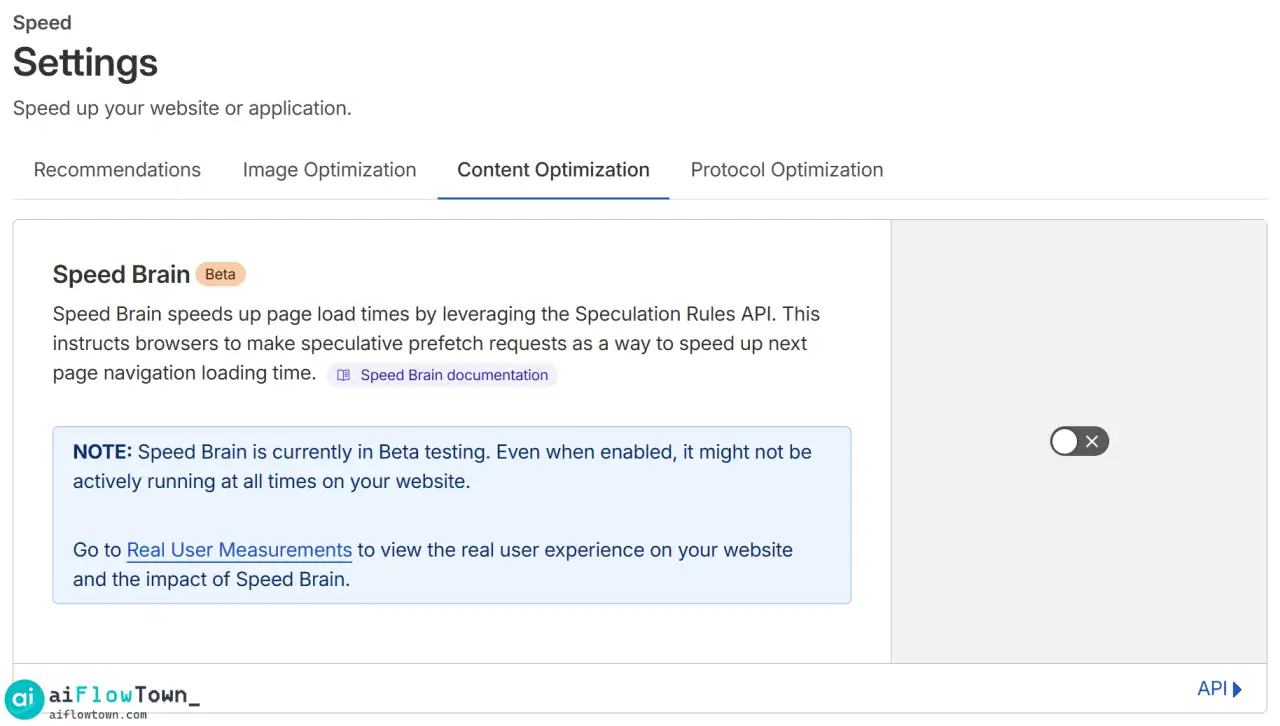
Once ChatGPT identified SpeedBrain as the culprit, the solution became straightforward:
Step-by-Step Fix
- Log into Cloudflare dashboard
- Select your domain
- Navigate to Speed → Content Optimization
- Find SpeedBrain (Beta) toggle
- Turn it OFF
- Go to Caching → Configuration
- Click Purge Everything
- Wait 2-3 minutes for purge to propagate
- Test your site in incognito browser
Optional: Disable Rocket Loader Too
While you’re in Cloudflare settings, consider disabling Rocket Loader under Speed → Optimization. Rocket Loader also manipulates JavaScript loading and can cause conflicts. If you’re already having JS issues, removing another layer of modification reduces variables.
This is how you fix random 503 on javascript files when the root cause is CDN edge behavior rather than server problems.
The Results: Instant Recovery
| Metric | Before Fix | After Fix |
|---|---|---|
| PageSpeed Score | 52 | 97 |
| JS File Status | 503 Service Unavailable | 200 OK |
| Total Blocking Time | High (red zone) | Low (green zone) |
| GSC Connection Errors | Multiple failures | Zero errors |
| Edge Server Response | Cached 503s | Fresh 200 responses |
After disabling SpeedBrain and purging cache, every JavaScript file loaded successfully. PageSpeed score recovered within minutes. Google Search Console crawl errors disappeared within 48 hours as Googlebot successfully re-crawled and rendered pages.
Why This Problem Is Hard to Diagnose
This issue is particularly sneaky because traditional debugging approaches fail:
Server-Side Debugging Doesn’t Help
You check server logs, see clean responses, and conclude the server is fine. You’re correct—but irrelevant. The problem occurs at the CDN edge layer, which your server never sees. Traditional server monitoring completely misses edge cache issues.
This is where AI-assisted debugging shows its value. ChatGPT doesn’t have the same cognitive biases humans have. When you’re stuck in “server-first” thinking, AI can suggest checking CDN layers you haven’t considered. For more strategies on using AI tools for technical troubleshooting, this case demonstrates how AI complements human expertise.
The Intermittent Nature
SpeedBrain doesn’t break all requests. It’s inconsistent based on edge server location, cache state, and speculative logic. One page load works fine. The next fails. This randomness makes it look like a transient network issue rather than a systematic problem.
The Cloudflare Header Clue
The key diagnostic clue is the Server: cloudflare header on 503 responses. When you see that header specifically on JavaScript files that should be loading from your origin, suspect edge behavior before blaming your infrastructure. That header means Cloudflare answered the request, not your server.
Lessons for Production Sites
Beta features belong in staging environments, not production. SpeedBrain promises performance gains but currently delivers performance disasters for some configurations. The risk isn’t worth the hypothetical benefit.
CDN Debugging Mindset
When files work via direct access but fail through normal page loads, think layers. Your stack isn’t just “browser → server” anymore. It’s “browser → CDN edge → CDN core → your server.” Problems can occur at any layer. Don’t assume the origin is always the culprit when responses include CDN headers.
Geographic Testing
If you have international traffic, test from multiple regions. A site working perfectly from your US office might be completely broken for users in Singapore. Use VPN or testing services to check from different geographic locations where different edge servers handle requests.
The Role of AI in Modern Debugging
This case demonstrates a new debugging workflow: when traditional methods hit a wall, describe the complete symptom pattern to AI. ChatGPT doesn’t replace technical expertise—it augments it by recognizing patterns across thousands of similar issues it’s been trained on. The combination of human domain knowledge and AI pattern recognition solves problems neither could solve alone efficiently.
❓ FAQ
Why do my JavaScript files show 503 but the server logs are clean?
Because the 503 is coming from your CDN edge cache, not your origin server. When you see “Server: cloudflare” in the response header, it means Cloudflare answered the request before it reached your server. Your logs will never show these failures.
⚠️ Why did PageSpeed suddenly drop when I didn’t change anything?
CDN configuration changes can break performance without touching your code. If Cloudflare enables or updates a beta feature like SpeedBrain, it affects all sites using that edge server. Your site broke because the CDN layer changed, not because you deployed something.
Why do some users see the site fine while others get broken JavaScript?
CDN edge servers vary by geographic region. If SpeedBrain has bugs on Asia-Pacific servers but works fine on US servers, Asian users see failures while American users see normal performance. Test from multiple regions to confirm.
I purged cache but files still return 503. What now?
Purging cache doesn’t fix a feature causing the problem—it just clears symptoms temporarily. If SpeedBrain (or similar optimization feature) is enabled, it will regenerate broken cache. You must disable the feature itself, then purge.
Why does Google Search Console report server errors when my server is up?
Googlebot sees what browsers see—your CDN responses. If Cloudflare serves 503s from edge cache, Google logs that as server failure even though your actual origin server is responding perfectly. The CDN layer is invisible to GSC error reporting.
Final Thoughts
Not every cdn returning 503 for static js files means your hosting is failing. Sometimes it’s your CDN being too clever for its own good. SpeedBrain’s speculation feature, while innovative, currently breaks JavaScript delivery for some sites in ways that are nearly impossible to diagnose without understanding edge cache behavior.
If your PageSpeed suddenly tanked, JavaScript files intermittently fail with 503, and Google Search Console reports server connection problems while your actual server is healthy—check Cloudflare SpeedBrain first. Disable it, purge cache, and watch everything snap back to normal.
Your server was never the problem. Your CDN was just trying too hard to be helpful. And sometimes, it takes AI to spot the pattern that human debugging misses.
Discovered and documented with the help of ChatGPT during a real-world debugging session.
⚠️ Reminder: Even the smartest tools / AI can miss small details or make mistakes. Always double-check your work before presenting or publishing it - a quick review can save hours later.