Do Better Research with AI-Assisted Thinking
Research is messy by nature. You start with curiosity and end with ten open tabs — each leading to a different rabbit hole. The problem isn’t lack of information; it’s how we organize it. That’s where ChatGPT research prompts come in. They help you ask the right questions, structure messy data, and test ideas faster than ever. Whether you’re validating a startup idea, writing an article, or doing academic work, ChatGPT can act like a second brain — guiding your reasoning, not replacing it.
The Psychology of Smart Research
AI as Your Thinking Partner
When you use AI correctly, it doesn’t just spit out facts. It mirrors your thought process — helping you clarify what you *really* want to know. Each well-crafted prompt becomes a thinking tool, not a command. You ask, it refines, and together, you reach insight faster.
From Curiosity to Validation
Great research isn’t about having all the answers; it’s about testing the right hypotheses. ChatGPT gives you a quick simulation of expert feedback before you invest hours into validation. It’s like brainstorming with a cross between a librarian and a strategist.
Work Smarter with These 25 Research Prompts
Below are the 25 best prompts to explore, analyze, and validate ideas in any field. Copy, tweak, and combine them for your own workflow.
Idea Discovery Prompts
- ✅ “List emerging problems in [industry] that haven’t been solved yet.”
- ✅ “Analyze trends shaping [topic] and what they mean for the next 5 years.”
- ✅ “Summarize the 3 biggest frustrations people have with [product/service].”
- ✅ “Generate 10 startup ideas that solve [specific problem].”
- ✅ “Compare 3 industries where this idea could have impact.”
- ✅ “Identify overlooked user groups affected by [trend or issue].”
Market & Audience Research Prompts
- ✅ “Who are the top competitors solving [problem] today, and what’s missing in their approach?”
- ✅ “Summarize 5 audience personas who would use this product.”
- ✅ “Write a problem statement from the user’s perspective about [issue].”
- ✅ “Generate customer journey stages for [target user].”
- ✅ “List 10 questions potential buyers might ask before purchase.”
- ✅ “Find sub-niches inside [industry] with growing demand.”
Validation & Comparison Prompts
- ✅ “Evaluate this idea using SWOT (Strengths, Weaknesses, Opportunities, Threats).”
- ✅ “Compare this idea with existing solutions on cost, effort, and outcome.”
- ✅ “Simulate feedback from an expert investor about this concept.”
- ✅ “Score this idea’s viability on a 1–10 scale and justify your reasoning.”
- ✅ “Identify potential risks or ethical issues with this idea.”
- ✅ “Suggest measurable metrics to test if this idea works.”
Data & Research Structuring Prompts
- ✅ “Turn this raw data into a structured comparison table.”
- ✅ “Summarize this research paper into bullet insights.”
- ✅ “Extract 5 trends from this list of customer reviews.”
- ✅ “Create a list of hypotheses based on this dataset.”
- ✅ “Simplify this scientific concept for non-experts.”
- ✅ “Generate 3 data-driven arguments supporting or rejecting this claim.”
Critical Thinking & Follow-up Prompts
- ✅ “Challenge my assumption: why might this idea fail?”
- ✅ “Play devil’s advocate and argue against my concept.”
- ✅ “Reframe this problem from a user, investor, and engineer’s perspective.”
- ✅ “Ask me 5 clarifying questions before giving recommendations.”
- ✅ “Suggest alternative angles I haven’t considered yet.”
Turning Prompts into a Research System
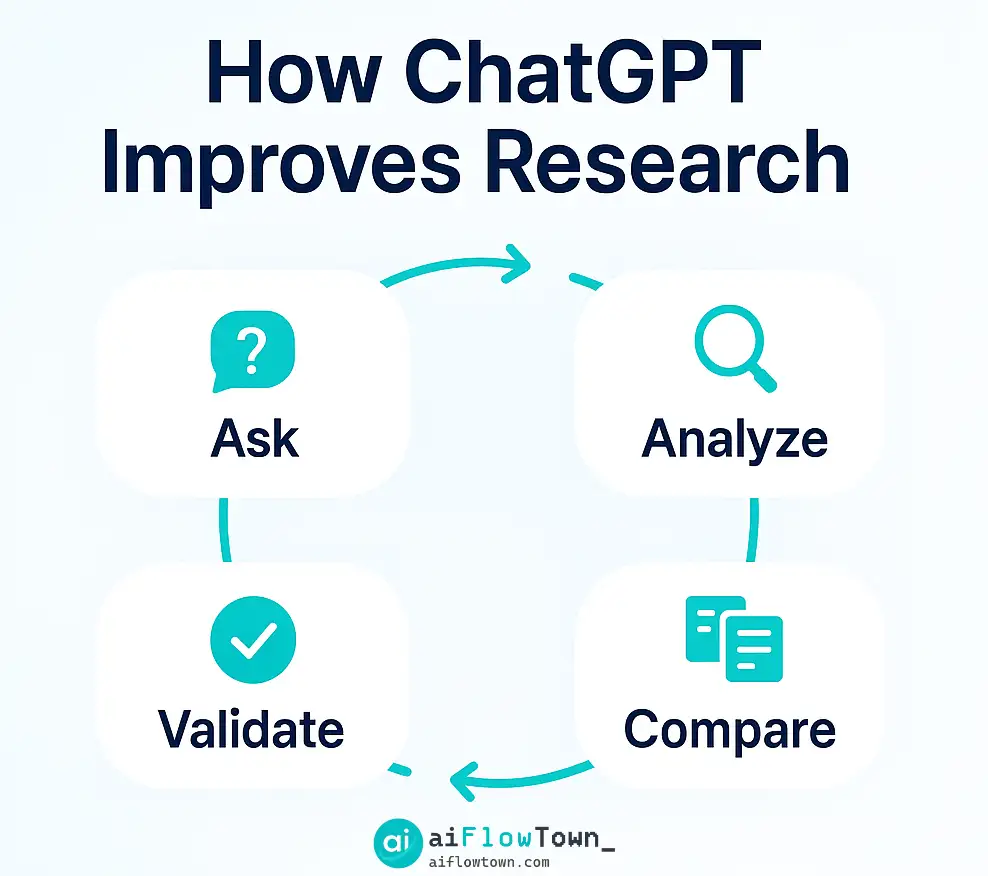
Step 1: Start Broad, Then Narrow
Begin with open-ended prompts like “What’s changing in [industry]?” Let AI paint the landscape. Once you find a spark, zoom in with specific validation prompts. Think of it as a funnel: curiosity → clarity → confirmation.
Step 2: Organize Results in Notion
Use Notion or Sheets to capture all AI outputs. Add tags for “Trend,” “Idea,” “Risk,” and “Next Step.” Over time, this becomes your research vault — searchable, sortable, and reusable. You can even connect it with automation from AI Automation Tools for Beginners to categorize insights automatically.
Step 3: Run Validation Loops
Once you have clarity, test hypotheses in small, measurable ways. ChatGPT can generate surveys, simulate responses, and even analyze early feedback. This builds a feedback loop between thinking and testing — the essence of smart research.
AI + Human: The Perfect Research Duo
AI Handles the Noise
AI processes what the human brain can’t — massive, unstructured data. It can read 100 articles, find patterns, and summarize in minutes. But it can’t choose what matters — that’s where you come in.
Humans Define the Why
Humans ask “why,” not just “what.” Your role is meaning-making. When you use prompts from AI Productivity Prompts, you’ll notice how your reasoning sharpens — because you’re not reacting to information, you’re directing it.
Common Mistakes in AI Research
- ❌ Asking vague questions (“Tell me about AI.”) → ✅ Be specific (“List 3 AI tools improving workflow efficiency for designers.”)
- ❌ Accepting first answers → ✅ Ask ChatGPT to justify reasoning or cite logic chains.
- ❌ Ignoring bias → ✅ Ask for counter-arguments or limitations each time.
- ❌ Dumping outputs → ✅ Store, tag, and compare them across sessions.
Practical Example: Validating a Startup Idea
Let’s say you’re testing an idea for an AI writing tool for lawyers. Here’s a simple workflow:
- ✅ Prompt 1: “List key pain points lawyers face when writing documents.”
- ✅ Prompt 2: “How are existing tools solving these?”
- ✅ Prompt 3: “What’s missing from their approach?”
- ✅ Prompt 4: “Draft a sample user persona for a mid-size law firm partner.”
- ✅ Prompt 5: “Generate 3 MVP feature ideas that directly solve those pain points.”
In 10 minutes, you’ve gone from abstract idea to actionable insights — something that might take days of desk research otherwise.
Building a Long-Term AI Research Habit
Research is iterative. The best workflows blend curiosity with consistency. Use a Notion template to log prompt sessions: topic, key insight, follow-up idea. Over time, you’ll notice patterns in your own thinking — and that’s where real breakthroughs happen.
Final Thoughts
These chatgpt research prompts aren’t shortcuts — they’re frameworks for better thinking. Every good researcher has a method; this just happens to be faster, clearer, and powered by AI. If knowledge is power, prompts are the handles you use to turn it. Explore more structured workflows at The 15 Best AI Productivity Tools and build your own idea validation engine today.
❓ FAQ
What makes these prompts effective for research?
They’re designed to think like experts — combining open-ended exploration with structured analysis, helping you uncover insights fast.
Can ChatGPT replace traditional research?
No. It accelerates discovery and organization, but human judgment is still essential for interpretation and accuracy.
How should I store my findings?
Use Notion, Airtable, or Google Sheets to catalog prompts and results. Automation can tag and cross-link ideas for future projects.
What’s a good way to start?
Pick one area — like market research — and test 3–5 prompts daily. Over time, refine based on which outputs feel most useful.
Where can I find more advanced prompt systems?
Visit AI Productivity Prompts for full libraries and integrated workflows.
⚠️ Reminder: Even the smartest tools / AI can miss small details or make mistakes. Always double-check your work before presenting or publishing it - a quick review can save hours later.